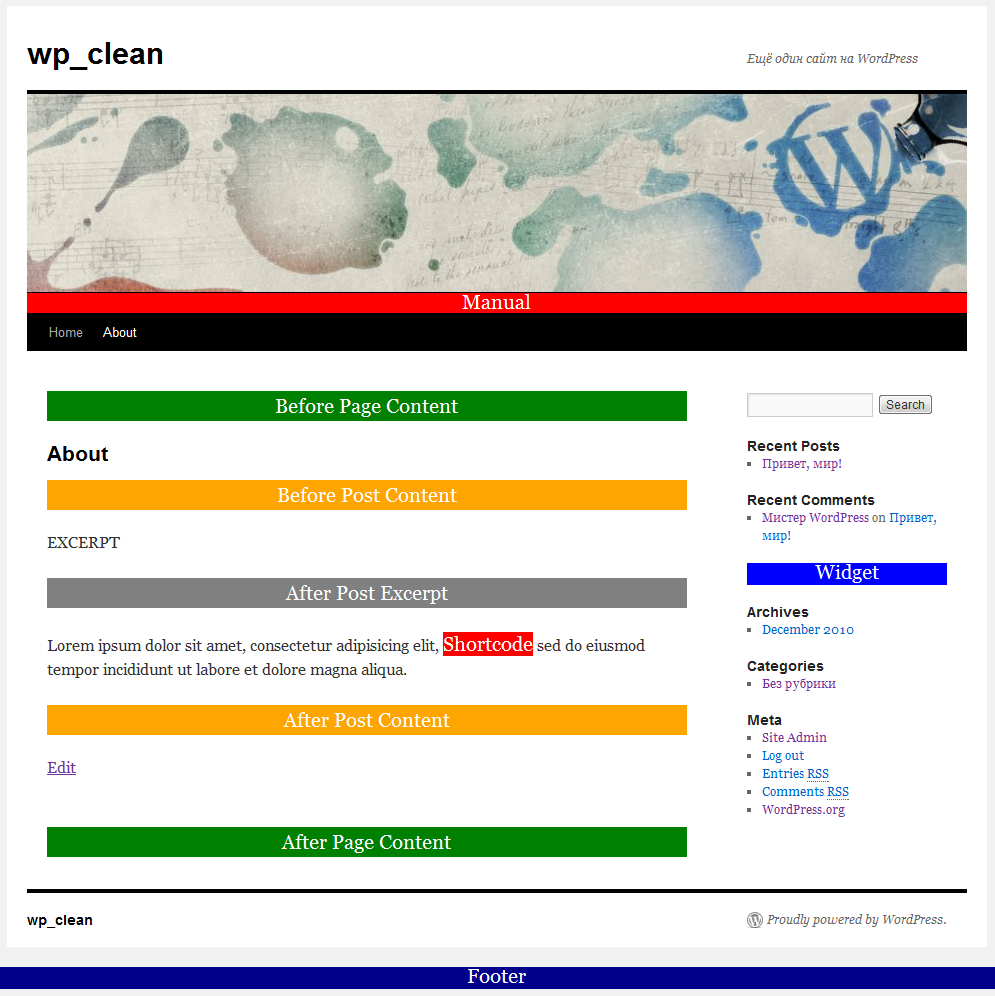
This plugin was made to easily add html, css, php or javascript code to public WordPress pages.
Contents:
UPDATE FROM ver 1.x to 2.x NOTE:
Following page selectors have been removed: All Posts, All Pages, Category Pages and Tag Pages.
Inserts that used them will not work. But don’t worry, just recreate «Insert» and «Exclude» rules and they will work again!
Installation
- Check minimal system requirements: WordPress 2.8.0, PHP 5.1.0.
- Download plugin.
- Unzip and upload `q2w3-inc-manager` folder to the `/wp-content/plugins/` directory.
- Activate the plugin through the ‘Plugins’ menu in WordPress.
Uninstallation
- On the ‘Plugins’ menu in WordPress click ‘Deactivate’ plugin link.
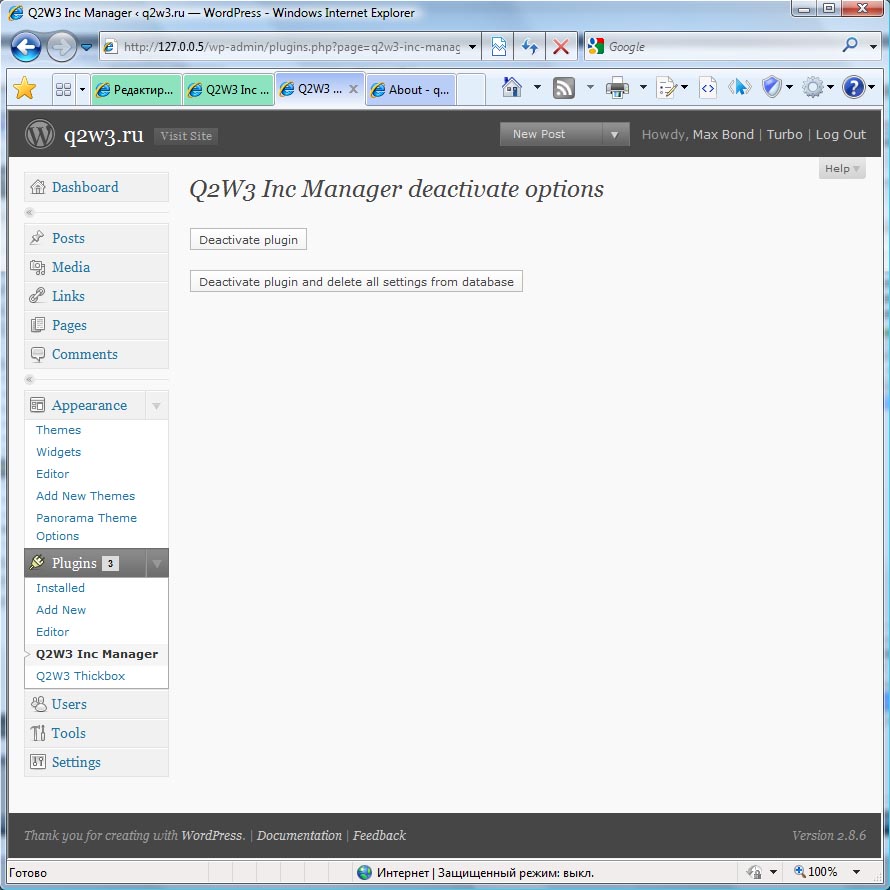
- You will be redirected to the page with two options:
- ‘Deactivate plugin’ — for simple plugin deactivation. Use it for temporary plugin deactivation if you plan to use plugin in future.
- ‘Deactivate plugin and delete all settings from database’ — for complete plugin deactivation. All data associated with the plugin will be deleted from database.
Working with plugin
First of all go to the plugin setting page.
To begin creation of your Include click ‘Create new’ button. Include options window will appear.
Let’s see what are the meanings of all those options:
- Description. A shot description of your code. Something like ‘My banner’ or ‘Google Analitics’.
- Status. There are two options:
- Active. Include code will be shown.
- Disabled. Include code will not be shown.
- Location. Here you can select area of the page where your code will appear. Possible locations are:
- Header (between <head></head> tags). Suitable for placing meta tags like Google Webmaster Tools ID, css or javascript code. Do not place here html code for visual output like <div>Hello</div>.
- Footer (bottom of the page). Suitable for placing any type of code. For expample this is a right place for Google Analitics code.
- Before page content (before WP loop). Suitable for any types of advertisement.
- After page content (after WP loop). Suitable for any types of advertisement.
- Before post content. Suitable for any types of advertisement.
- After post excerpt (since version 2.0.0).
- After post content. Suitable for any types of advertisement.
- Widget. Suitable for inserting advertisement blocks to the sidebar. Widget must be activated on the Appearance->Widgets page.
- There is a sub option for Widget location — Widget title. This title is only for public pages. If no title provided, only widget include code will be displayed.
- Manual. This option allows you to place php function directly in your theme file.
- Shortcode. Insert code inside page or post content.
- Priority. This field determines display order of the includes placed in the same location. Field value must be integer. Includes with equal priorities are sorted by creation time. Newer includes will be displayed after older. If you set priority to 0 or leave it empty, after saving include priority value will become equal to 100. This is done to create include with priority ‘always first’ and ‘always last’. To make include always first set priority to 1 and make sure that there are no other includes with this priority in the same location. To make include always last set priority higher than 100 (for example 1000). Now all new includes with undefined priority will be placed between ‘always first’ and ‘always last’.
- Include on. Here you can select pages where your code CAN be shown. To select multiple pages or deselect page hold CTRL key. WordPress pages, posts pages, categories pages and tag pages can be selected one by one. Also there are several special page selectors:
- All. That means all public pages.
- Front page. Whether it is posts or a Page. Sub pages also belong to the front page. To exclude subpages select `Paged pages` in Exclude on section.
- WP pages. These are WordPress Pages, not any generic webpage from your blog.
- Posts pages. All post pages.
- Date pages. These are all date-based archive pages (i.e. a monthly, yearly, daily or time-based archive).
- Category pages. All Category archive pages.
- Tag pages. All Tag archive pages.
- Author pages. All author pages.
- Attachment pages. All attachment pages.
- Paged pages. All pages being displayed as «paged». This refers to an archive or the main page being split up over several pages. Only second and subsequent pages are considered «paged». This does not refer to a Post or Page whose content has been divided into pages using the nextpage QuickTag.
- Search page. Any search result page.
- Preview page. Single post page displayed in Draft mode.
- Page 404. Paged displayed when ‘HTTP 404 Page not found’ error happens.
- Exclude on. Here you can select pages where your code CANNOT be shown. Multiple select can be done by holding CTRL key.
- Hide from admin. Since version 2.0 this option upgraded to Hide from user. Now you can specify user groups to hide code from.
- Code. Html, css or javascript code. Inclusion of PHP code supported since version 1.1.0. PHP code must begins with `php open tag` (<?php). Examples:
PHP only
<?php // php open tag is required echo 'WP variable: '; print_r($GLOBALS['wp']); // php close tag is not required
PHP and html
<h1>Hello!</h1> <?php echo 'PHP!' ?> <h2>Bye!</h2>
- Sub option Align (since version 1.1.0). Allows you to set horizontal align of the included code. Useful for aligning Google AdSense blocks.
A few words about settings page interface.
You can select table columns which will be displayed and can change number of table rows per page. To do this go to Screen options menu.
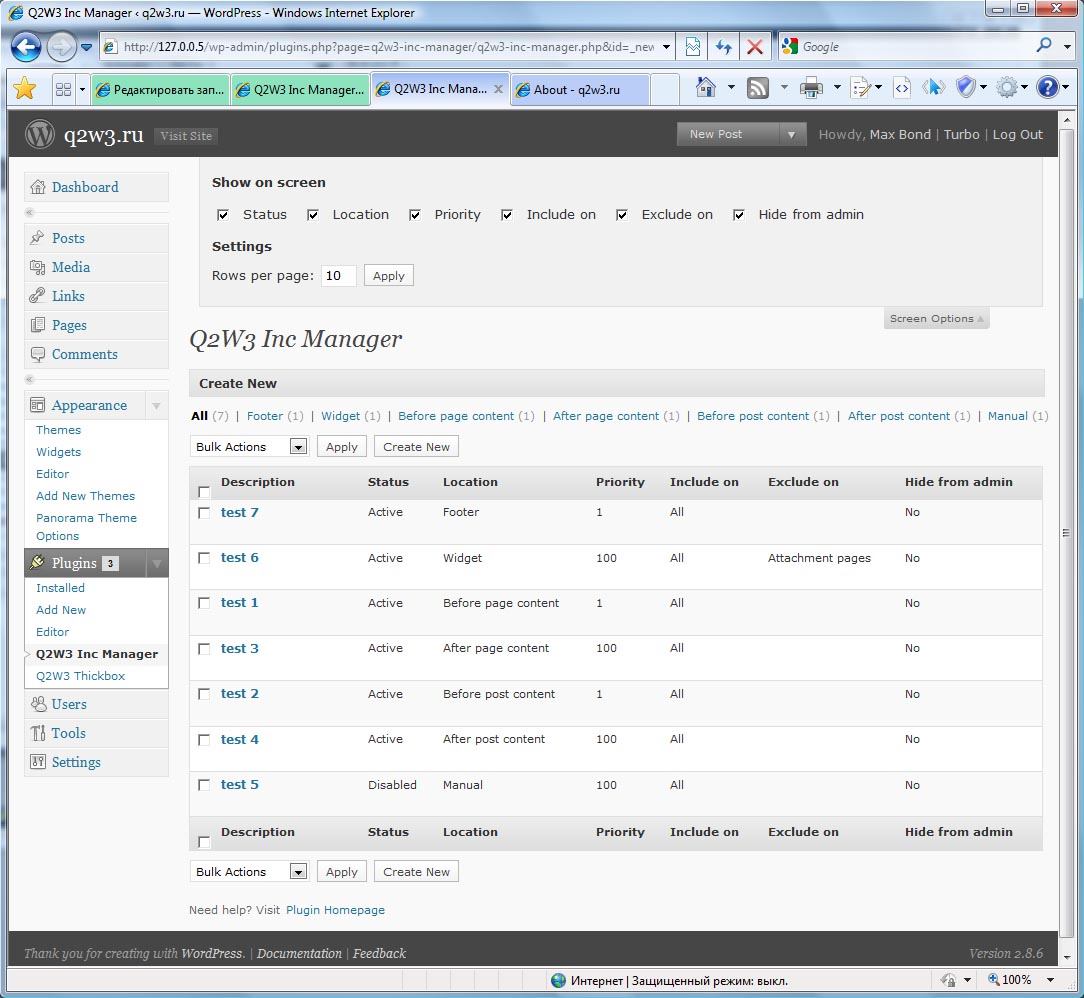
Also if Include options window is taking to much place you can minimize it by clicking on the window top bar (see screen shot above).
Frequently Asked Questions
-
How many Includes may I create?
The number of Includes is unlimited.
-
What is ‘Widget title’ option?
This option allows you to specify widget title for public WordPress pages. It will be displayed like Categories or Tags widget titles.
If you leave this option blanc, widget will be displayed without title. -
I have set priority to 0 or left it blanc, but after saving it equals 100. Why?
This is done to help you create Include with priority ‘always first’ and ‘always last’. To make Include always first set priority to 1 and make sure that there are no other includes with this priority in the same location. To make include always last set priority higher than 100 (for example 1000). Now all new includes with undefined priority will be placed between ‘always first’ and ‘always last’.
-
Why Widget and Manual Includes priority is always 100 and I can’t change it?
Widget and Manual Includes don’t use priority number for sorting. Don’t worry about it.
-
In wich order sorted Includes with equal priorities?
Equal priority Includes are sorted by creation time. Newer includes will be displayed after older.
Changelog
- 2.3.0
Added ability to insert shortcodes in comments. Option must be enabled in Code Insert Manager -> Settings page - 2.2.0
Added support for Custom Post Type Archive pages
Fixed small bug with Opera multiple select - 2.1.2
Fixed conflict with Find and replace plugin (Guys, why are you creating new user instance each time?!?). - 2.1.1
Added German translation - 2.1.0
Post Formats are now available for page filters
To admin page added search form and capability to filter table by status (Active/Disabled) - 2.0.1
Plugin renamed to Code Insert Manager
Added support for custom post types (support for each post type must be enabled on plugin settings page)
Added support for custom taxonomies (support for each taxonomy must be enabled on plugin settings page)
Added new insert location — After post excerpt
Hide from admin option is upgraded to Hide from user
Admin menu entry moved to top level - 1.3.1
Added French translation. - 1.3.0
Added new location — shortcode - 1.2.4
Fixed php evaluation error in Manual include mode
Plugin was successfully tested in WordPress 3.0 - 1.2.3
Improved page detection on themes with modified loop. - 1.2.2
Fixed high memory usage on blogs with large number of posts/categories (more than 1000) - 1.2.1
Fixed broken links (in plugin settings page) when WordPress installed in a subdirectory. - 1.2.0
Fixed errors in WordPress MU. - 1.1.0
New. Includes with PHP code now supported.
New. Align option added. - 1.0.1
Fixed ‘Create New’ button malfunction in Opera and Firefox.
Fixed ‘Parse error: syntax error, unexpected T_PROTECTED in /htdocs/wp-content/plugins/q2w3-inc-manager/q2w3-table/q2w3_table.php on line 736′. - 1.0
First public release.
Other Q2W3 plugins:
| Tweet |


Thanks for this great plugin.
Can you add an option to insert code to RSS feed as well.
Hi Max,
I’m pretty new to WP code and PHP overall. I’m just wondering if you can use post variables directly right after post ends.
For example: If I use «code insert» after post and I need to get post title and URL. Is there WP variables to use? I want to add facebook share so I need to add post URL to It.
Thanks
Hello!
You can access post data.
To view all available data insert this code:
Print post title:
Print post permalink:
Hi Max Bond, please help me!
I changed (wp-contet) to > (x-name) and I get this message when working with plugin: Can not find wp-load.php!
I changed line 2313—-> $res .= ‘ $wp_content_dir = ‘x-name’; in q2w3_table_func.php ,but not working yet and received that message.
where there is a need to change?
Thanks.
Hi!
Replace function wp_load() in q2w3_table_func file by this function:
public static function wp_load() { $wp_root = dirname(dirname(dirname(dirname(dirname(__FILE__))))); if (file_exists($wp_root.'/wp-load.php')) { return $wp_root.'/wp-load.php'; } else { exit('Can not find wp-load.php!'); } }This version doesn’t need wp-content dir to find wp-load.php!
Hello, thanks Max Bond! This is great…! thanks a lot.
Hello! Reading the thread back someone had mentioned multi-site support. Is there any way you could make the plugin menu show up on the «network admin» for a WP multi site so that the code inserts show up on all sub-domain blogs? There does not seem to be a plugin out there that can handle this.
Thank you
I’ll try to add this feature… before end of year…
Max, I want to talk to you about about some localizations of your plugin. Please email me soon.
Thanks,
Brian F
help please — i’ve run through all the plugin files but the code is to advanced for me and I just can’t find the bug:
i’ve installed and activated the plugin but whenever I want to add any new code insert it says:
«DB error: Table ‘homiki2.wp_q2w3_inc_manager’ doesn’t exis»
and indeed, for some reason, this table wasn’t created upon installation and activation of the plugin. but i just can’t find the code where i could check the propoer table structure and hopefully create it in my WP databese myself :///
any tips?
Any errors on activating plugin?
Try to completely uninstall plugin, then activate again…
If this will not help, here is table structure:
well… i did the re-install thing — no help
and during the activation and installation no errors were reported :(
i will try your sql and let you know if it helped ;)
works like a charm :)))) thank you for that great plugin ;D
Hi, the plugin sounds great but after installing and activating it the settings link doesn’t show in the admin sidebar anywhere. I deactivated and reactivated it and still can’t find it. I even updated my wp install to ver 3.2.1.
Hm… It should be at the bottom of the main menu as you can see on the video… My be plugin conflict?..
Try to open settings page by changing browser address. You dashborad link looks like this:
http://your-domain/wp-admin/index.php
Change it to:
http://your-domain/wp-admin/admin.php?page=q2w3-inc-manager
Is it working?
I tried what you said and when i go to that address with my domain name inserted it says, «You do not have sufficient permissions to access this page.»
The plugin doesn’t show at the bottom or anywhere on the menu or in any submenus in the admin area. I can get into the settings areas for other plugins.
Any idea what sort of plugins it might conflict with?
It’s not working completely… hm…
Can you tell me what plugings are you using?
Deactivating one at a time I found it was a plugin called Find and Replace that was blocking it from appearing on the menu. I had just added and used that to correct a figure on some 80 posts. Deactivated it and now I can see your settings. I don’t know if once set up it will still work if I reactivate Find and Replace. Otherwise I might have to deactivate that latter one after each use.
Thanks! I’ll make tests to see why they are conflicting.
I fixed this conflict. Update to version 2.1.2
Hi,how do i insert this ,so i can get my stats showing.?
Dont not what code to use,so i see the stats instead of just the html link.
the url for the stats- http://www.endomondo.com/embed/user/summary?id=284280&sport=2&from=20110701&measure=0&zone=Gp0100_CPH
thx for a great pluginn and aim sorry to be a noob ;-)
Hello!
You can insert your stats page with iframe.
Code to insert:
Love Your plugin.
I have a problem: configure the adsense code to align center Before page content, and the ads comes allways align left. If I replace the adsense code by a snipo of test, it alins center…
Any Idea?
Thank You
Amaro
Hello!
Can you give a link to one of your pages with not aligned ad block?
Is an instalation on localhost…
The code is oc:
But the ads is not centered. I could send You an screenshot..
Thank You
Amaro
Ааа… on localhost…
I think it may be a css problem. So I wanted to see your resulting css rules with Google Chrome «View element code» feature (great for debugging css)…
This plugin would be perfect if it could ENFORCE locations in wordpress sites of a multisite install.
In other words: Additionally to the locations within a blog [include on all pages, include on front page, ...] you would also have [include on blog X, exclude on blog Y] etc..
This is important if you for example want to force AdSense throughout all your sub-blog, or a sitemap throughout your subblogs.
What do you think?
This is very good idea, I think )
I am about to release version 2.0 soon.
These multisite functions I’ll try to add in the next 2.1 version.
Trying to use your promissing plugin in a WPMU installation - however after creating a new entry we got following error. Can you advise how to resolve? — Tx Erik W.
DB error: Table ‘blognl_blog3.q2w3_inc_manager’ doesn’t exist
Unfortunately version 1.3.x have problems with WPMU… sorry
But in a few days I am about to release new version (2.0) of the plugin. You can download it here.
There are a lot of changes (support of custom post types and custom taxonomies) and bug fixes. I tested it in WPMU right today and it worked ok.
Before 2.0 install, don’t forget to completely deactivate plugin!
i dont know WTF going on with that but you can give us some short code to manualy add tables to DB?
Great you are working on a solution. I will wait with installation till you give the green light. Can you send me an email when you are sure everything works ok? Thank you — Erik W.
«Hide from Admin» doesn’t seem to work. Both the widget and the code within the widget is always visible. It’s always unhidden. I use 1.3.1
This option working only for logged in Admin users. May be this is the reason?
No, this is not the reason.
Ok.
Let’s do a test.
Create a new widget Include.
Include code should be:
<pre>
<?php
$user = wp_get_current_user();
var_dump($user->wp_user_level);
echo '<hr/>';
var_dump($this);
?>
</pre>
Activate widget and see its output. Try it with «Hide from admin» turned off and on. Send output (both variants) to me.
i cant give any access to see plugin..
but i use this plugin in two server
1) http://avidppc.com/wp-content/plugins/q2w3-inc-manager/q2w3-table/q2w3_get.php?action=q2w3_table_wp_page_select&id=inc_pages_select&type=include&wp_nonce=04557ebf39
page not found
2)http://www.mediaflint.com/shusterman/site/wp-content/plugins/q2w3-inc-manager/q2w3-table/q2w3_get.php?action=q2w3_table_wp_page_select&id=inc_pages_select&type=include&wp_nonce=625b857512
and in this server plugin.. works fine.
plz guide me.
I cannot understand what happening on avidppc.com …
When I try to access any php file inside plugins folder, server redirects me to the page with title «Nothing found for…».
Do you have plugins for site protection installed or something relative?!?
yes i do these points… a page not msg shown…
Can you give me access to plugin page? Need to see what is happening there.
Use form on this page: http://www.q2w3.ru/contacts/
Hi Q2w3 Inc Manger Plugin Admin.
YOur plugin is very nice and user friendly.. in start plugin running successfully but now when use this plugin and include pages the pop up screen is come out blank there is no any pages title shows.. i dont know why.. plz help me.. i update this plugin … but not any solution for this problem.
Hello!
Try the following:
1. Go to plugin page and find link that shows popup window for pages selection ([...]).
2. Right click on it and select «Copy link address» option or something like this (depends on your browser).
4. Open new browser tab (not new window) and open there copied link.
5. Did you see list of pages? If no, open wp-config.php file in the root of your WP installation and add this code — define(‘WP_DEBUG’, true); (place it after WPLANG constant) . Save wp-config and reload the page. Now you should see errors. Copy all output and send to me.
6. Remove define(‘WP_DEBUG’, true); from wp-config. I do not recommend to make this test on a production site. It will be unavailable during WP_DEBUG on.
probably have something like that in htaccess
# RewriteCond %{REQUEST_METHOD} =POST
# RewriteCond %{HTTP:Content-Type} !^(application/x-www-form-urlencoded|multipart/form-data.*(boundary.*)?)$ [NC]
# RewriteCond %{REQUEST_URI} !^/(wp-login.php|wp-admin/|wp-content/plugins/|wp-includes/).* [NC]
# RewriteRule .* — [F,NS,L]
could break the plugin
Hello Max
working translation for french langage realised where did i send it
Thank you very much. I have send e-mail to you — look at inbox.
Send your translation with the reply!
Thanks for the greate plugin. Just one thing disappointed, it doesn’t work with wordpress shortcode. So I can’t use it at this moment.
Hm… Excellent idea! I’ll add support of shortcode includes in the next release.
Oh great. I am waiting for it :-)
Hi Max,
I spent a whole and finally found a work around solution. Actaully, I can use :
<?phpechodo_shortcode('[shortcode option1="value1" option2="value2"]'); ?>Just replace[shortcode option1="value1" option2="value2"] with your shortcode, it will work !Now I understood what are you talking about )
You have found the best way to execute shortcode inside include.
But I thought, you need to place include with help of shortcode inside post or page! Just to create new kind of location — SHORTCODE. Heh )))
great plugin…handy staff
Thanks Max !
Where is your «donate button»???
Aaa… there is no «donate button» )
If you want to help, rate this plugin five stars at http://wordpress.org/extend/plugins/q2w3-inc-manager/
Is it possible to get and include in between the «header» and the «before page content» ?
There is no option for this on the drop down provided and it is what I need. Whatever I place goes on the actual head tag (great for meta tags)or into just above this :
I mean I need it to go above the [div class="header"] tag on the header.php
I think you need to try manual include location.
Set Location option to «Manual» and then place < ?php q2w3_inc_manager::manual_inc(your_inc_id) ?> directly into your header.php where you need.
Thanks for writing back Max! Great Plugin !
The trouble is that I need to add a different scroller on each page, I guess I will make an include and work some php to handle this.
Cheers!
Hi Max,
I’m going nuts and no way I can make this simple test work.
I create a new
status=active; location manual; include on front page
inlude code :
[My HTML test]
[]
I place this in several locations on the template header and can only see the HTML but not the PHP, is it something I need to activate on Apache/php?
On viewing the source code the php is there but it is not read by the browser. I’m i going stupid?
There is no need to activate any apache/php extensions.
Let me see your Include code.
Exactly as you have the exaple php and html code above.
That was a bug… Sorry )
Update to version 1.2.4, to fix it!
EXCELLENT plugins…..!
I have this running Ok on several sites, very very useful, thanks.
Just uploaded to 2.8.3 in a sub directory and although the plug in loaded OK when I open the Include on link the Pages popup is blank.
Any suggestions?
Thanks
Can you tell me where this link points to?
And what is your WP installation directory structure?
http://www.mydomain.com/shop/wp-content/plugins/q2w3-inc-manager/q2w3-table/q2w3_get.php?action=q2w3_table_wp_page_select&id=inc_pages_select&type=include&wp_nonce=fc01b6d1b4
This is the link that fails
I am attempting to creat a new inclusion.
I have installed the pluging on two sub directoies on this domain and they both fail.
Thanks
I just installed the plug in on another blog in the root of a domain but on the same server and I get the same problem.
Is the pop up script using ajax or something that needs a current install on the server?
Installed it on another blog on a different server and that runs OK, looks like it is related to that server set up ( VPS)
Plugin uses thickbox library for popups. This library is supplied with WordPress.
What happend with other popups windows in wp-admin (for expample insert image to the post window), are they working properly?
Insert Imgage in to post function worked fine.
Try to open this link in a browser (login to wp-admin and then open a new window in a browser). If you’ll see list of pages — link is ok, if you’ll see ‘page not found’ — problem in a link.
I already tried to open the link in a fresh browser but all I got was a blank page ( View Source showed no code for the blank page at all )
Try to do the following:
1. Log in to wp-admin
2. Copy ‘Include on’ link
3. Open a new tab in the same browser window
4. Open copied link in this new tab
I think you’ll see some kind of error.
If you’ll see blanc page again, look at web-server error log file for any php errors related to the time when you tried to open this link.
Same result, totally blank pop up page.
Tried to check error logs but they are blank, got my hosting company looking into why they nor recording, will try again later.
Thanks
Check your inbox!
I have sent e-mail to you with file for debugging.
Problem fixed in version 1.2.2
Many thanks for the fix in 1.2.2
I installed and when I click create new it sends me to http://malecelebsexposed.com/wordpress/wordpress/wp-admin/plugins.php?page=q2w3-inc-manager/q2w3-inc-manager.php&id=_new_ which displays my blog’s home page.
I noticed the problem when I posted here. During install it put /wordpress/wordpress/ in all its internal links so everything results in 404 error. My blog runs from / and all files other than index.php are in /wordpress/
Until till problem is resolved can’t use program. Too bad. Looked good. Let me know when problem fixed. Thx
Hello! The problem is fixed! Update to version 1.2.1
hi there .thanks for plugin, Does anybody know if tis script is compatible with WordPress 2.9 ? Thanks in advance for any help on this! Regards
Compatible! It is runing on this blog (WP 2.9.2).
The function does not include me
place an example of how I use
Do you mean function for manual include?
To create manual include follow this steps:
1. Create New Include
2. On the Include options screen select Location «Manual»
3. Fill other options (include code and so on)
4. Save Include
5. After saving Include look at the Location option. On the right of it will be displayed php code to be used in theme files. Copy this code to the clipboard (CRTL + C)
6. Then you must place this code in to the theme file (for example single.php or category.php, or both) in the place where you want
Nice plugin, easiest way to add css and js in a page or post without editing header.php of wordpress theme.
Hi Max,
Me again :) .I tried use the new feature php code in the new version. when i put wordpress function like wp_enqueue_script() in header, it doesn’t work. but works if i put ‘echo’ thing. is this because the plugin appended the scripts/codes after wp_header() ? this is not a really problem for me. anyway, great plugin!
Thank!
Hi Azlan!
Good to see you )
Function wp_enqueue_script() will not work if it is called from a wp_head action, as the tags are output before wp_head runs. It must be called earlier from an init action function (to load it in all pages), template_redirect (to load it in public pages only), or admin_print_scripts (for admin pages only).
I don’t recommend to use any wp functions wich must be called before page output begins.
OK..It’s done! Thank Max…
Hi, Azlan!
Thank you again for bug report! )
Looks like dbDelta function failed to correctly update table… eh. That was completely unexpected for me…
Column `code align` must have INT type.
Here is a file for automatic update.
Unzip it and upload to ‘q2w3-inc-manager/q2w3-table’ folder and then launch from browser ‘http://127.0.0.5/wp-content/plugins/q2w3-inc-manager/q2w3-table/q2w3_table_updater.php’, where 127.0.0.5 is your site domain.
After update you can delete this file.
hi Max,
After i figured it out, i know what the problem is. attribute ‘code_align’ is missing at the table ‘q2w3_inc_manager’ because your plugin do not checking and altering that table for include your new feature ‘code align’. can u give me the attribute type for ‘code_align’ field so i can alter it manually.
Thank You
Your plugin are very great. After i updated this plugin to version 1.1.0, i can’t edit or created new ‘include’.
Something error with db,
«DB error: Unknown column ‘code_align’ in ‘field list’»
yes already received your email. It’s works like a charm. Thank bro..
I am using the same versions of WP and PHP and have no errors…
Is there anybody with this problem?
Azlan, did you recieve my e-mail?
failed to activate the plugin.
«Parse error: syntax error, unexpected T_PROTECTED in /htdocs/wp-content/plugins/q2w3-inc-manager/q2w3-table/q2w3_table.php on line 736″
my wordpress is version 2.86 and php 5.2.10